
TL;DR: A Google SERP feature is any result on a Search Engine Results Page that’s not one of the traditional organic blue links. Think Featured Snippets, Knowledge Panels, Local Packs, Image Packs, Video Carousels, AI Overviews and more. These elements dominate user search journeys, shape click-through rates and often appear above or alongside classic organic listings — meaning that brands must now optimize content and business profile data for visibility far beyond “just ranking on Page 1.”
Search Engine Results Pages (SERPs) contain links to websites that the search engine deems relevant to a user’s search query. You’re also likely to find Google Ads listings at the top and bottom of the page — these allow brands to appear in search results for keywords that are otherwise difficult to rank for. But what about everything else you see on a SERP?
Knowledge graphs, videos, image carousels, Popular Products shelves and Rich Snippets are known as SERP features. All of these, plus newer experiences like AI Overviews, AI Mode summaries and Discussions & Forums panels, routinely appear above or in between the familiar blue links. The type of features you see on a SERP depends on your query, search intent, device, location and dozens of other contextual factors that Google uses to understand your intention.
Table of Contents
- Every Google SERP Feature You Need To Know in 2026
- AI Overviews & AI Mode: The Newest Google SERP Heavyweights
- How Often Do SERP Features Appear? (Data Snapshot 2026)
- SERP Features Through Time: An Example
- Why SERP Features Are Important
- How Does a SERP Feature Fit Into Your SEO Strategy?
- Optimizing Your Content With a SERP Feature in Mind: The Basics
- FAQ: Google SERP Features
Every Google SERP Feature You Need To Know in 2026
Direct Answer Box
The aptly named Direct Answer Box provides a clear response to the user’s query. These usually take the form of short pieces of information that are public-domain facts. This feature does not cite a direct source or contain any backlinks, which means there is no value in it for brands — at least not in the traditional organic sense. However, from a user experience and zero-click search perspective, the Direct Answer Box demonstrates Google’s priority to satisfy intent instantly.
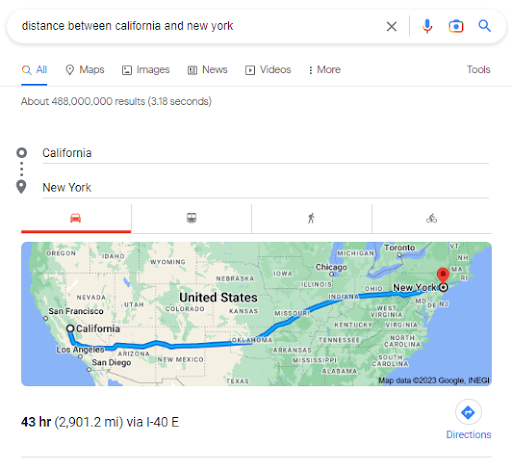
How to optimize: To put it simply, you can’t optimize for this SERP feature. Brands are ineligible to be featured in the answer box. Plus, users who get the immediate answer to their question aren’t likely to click further for more information — it’s more of a get-your-answer-and-leave type of situation. Instead, focus on supporting content that might earn downstream clicks from related searches or “Read more” results.
Featured Snippets (Multiple Variations)
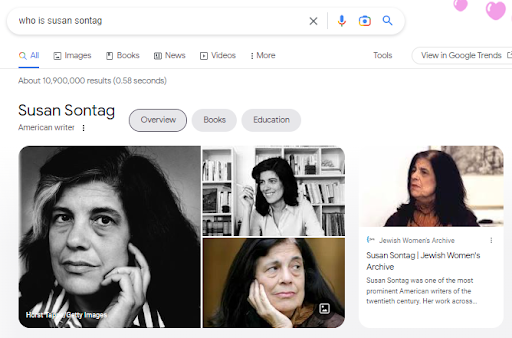
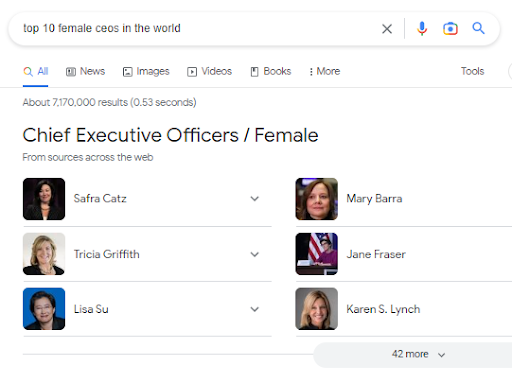
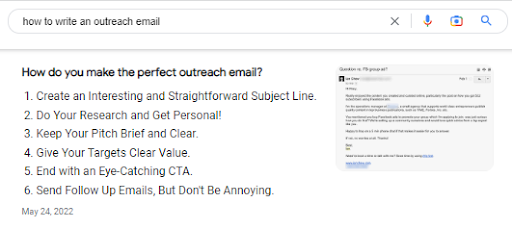
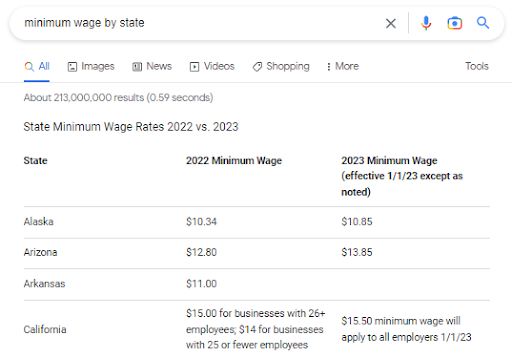
These are snippets of added context that typically credit a source and are deemed by Google to be the most contextually relevant result. Featured Snippets sit at Position 0 on the page, outranking all other organic listings and frequently influencing AI Overviews. Featured Snippets are served in many display formats based on the intent of the search query and the type of information to be featured. Those featured snippet formats include:
Paragraphs (e.g., FAQs, how-tos, “Who is,” “What is”)
Bulleted lists (e.g., rankings, “best of” lists)
Numbered lists (e.g., recipes, how-tos, DIY tasks)
Tables (e.g., prices, rates, data)
How to optimize: Although Google has the ability to pull information from your web pages and reformat it for SERPs, you can make it much easier on the search engine if you pre-format your content with the intention of it qualifying for a Featured Snippet opportunity. If you want to win a Bulleted Featured Snippet, for example, you would ideally format a chunk of text into bullets and include the target keyword in a subheading. The same process follows for Tables, Numbered Lists and other forms of Featured Snippets.
In general, the higher up on the page your keyword-centric copy appears, the better the result. Make sure to provide 45-to-60-word answers, embed schema markup where appropriate and ensure the snippet is semantically tied to related queries so that Featured Snippets can reference your page.
Rich Snippets
A Rich Snippet provides additional lines of context to an organic Google search result. This can include information such as product or service ratings, prices, availability or a brief description of an offering, and it’s found in the structured data found in a page’s HTML. By surfacing stars, pricing or FAQs, Rich Snippets help a local business or eCommerce site stand out among otherwise plain blue links.
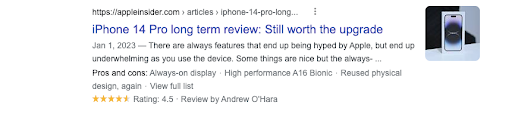
How to optimize: Rich Snippets require the use of structured data and schema markup, a semantic tagging vocabulary that Google uses to parse through web pages and best serve users’ results. Tagging your product pages with schema alerts Google that it should display your result with the additional rich result context, which can lead to a higher organic click-through rate and improved search intent alignment.
Shopping Results
You’ll see Google Shopping Results and interactive “Popular Products” grids appear for queries where the search engine detects transactional intent. These modules display rich product cards containing an image, title, price, reviews and sometimes shipping/return data. A common misconception is that you must run a paid Google Ads campaign to appear here. While paid Shopping Ads (often driven by Performance Max campaigns) do secure the premium top slots, Google’s Shopping Graph now displays billions of free, organic product listings across the SERP, the Shopping Tab, Google Lens and even within AI Overviews.
How to optimize: To qualify for organic Shopping results, you must submit an optimized product feed to Google Merchant Center (now fully migrated to Merchant Center as of 2026) and ensure you are opted into “Free product listings.” Accurate on-page Product structured data (schema markup) is equally critical, as Google’s Shopping Graph relies on your site’s HTML to verify prices, stock status and return policies in real-time. High-resolution images, competitive pricing and strong customer reviews will improve your visibility in both free listings and paid Shopping campaigns.
Note: Google has retired the legacy Content API for Shopping as of August 18, 2026, requiring merchants to use the new modular Merchant API to keep feeds syncing correctly.
Video
Sometimes, Google will display a video result as the top answer to a question query if that form of content is deemed the most effective at giving the user the correct information. The video is typically hosted on YouTube. In some cases, Google will queue up the video at a specific timestamp where the related question is answered. The search giant also historically rolled out Video Carousels and Key Moments — expanded video carousels that surface multiple clips or chapters, giving creators additional real estate to capture attention.
In 2025, Google also began rolling out AI Overview Video Carousels. This was a major update that deeply integrated video clips into Google’s generative AI summaries, allowing the AI to pull specific, relevant sections of videos directly into the overview grids.
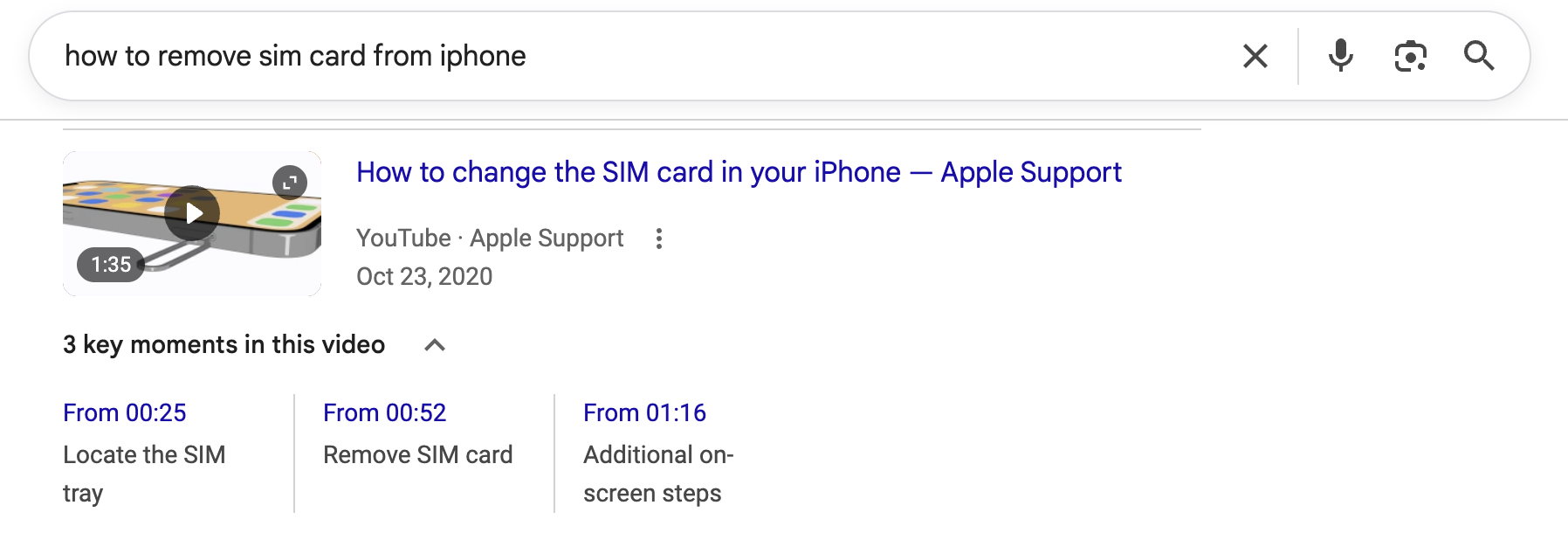
How to optimize: When uploading videos to YouTube, ensure that the video — and your channel — have complete metadata. Remember that videos should follow some of the same SEO and GEO rules as other types of content to increase your chance of winning the ranking.
Rich Results for Mobile Search (Previously “Rich Cards”)
In mobile search, Rich Results appear as clean, formatted cards that lend themselves to smaller screens. They can contain images, ratings, prices and small amounts of text. As mobile channels become more important with each passing year, getting your content featured hereshould be a goal for many brands that rely on on-the-go search behavior.
Note that “Rich Results” is an umbrella term for visual features including Rich Snippets, Rich Cards and more.
How to optimize: Similar to Rich Snippets, you’ll need to employ structured data markup via schema. Google provides free tagging help, HTML coding plugins and testing tools to ensure accuracy and implementation of schema.
Knowledge Graph
The Knowledge Graph is the massive, invisible backend database that Google uses to map the relationships between billions of “entities” (people, places, businesses, things). It enables related Knowledge Panels to display images, factual information and more.
Google scrapes data from internal and external sources (notably, Wikipedia) to feature here. This feature first appeared in a 2012 Google algorithm update.
How to optimize: Updated Google Business Profile accounts, websites and online directories are great ways to make information easily available to search engines and searchers. Google may pull data from a brand’s About Us page, Wikipedia page or various business listings, among others. Structuring the data on a few organization-specific pages of your website can also cue Google to properly categorize your information as eligible for Knowledge Graph results.
Knowledge Panel
Visually, Knowledge Panels look like prominent informational cards that appear on the right side of desktop results or near the top on mobile. They summarize essential facts about a known entity — such as a brand, person, movie or historical event. It’s important to distinguish these from Local Panels, which look similar but are powered entirely by Google Business Profiles for brick-and-mortar businesses.
True Knowledge Panels are the visual front door to Google’s Knowledge Graph, pulling verified data from trusted, third-party sources like Wikipedia, Wikidata, Bloomberg and authoritative web entities.
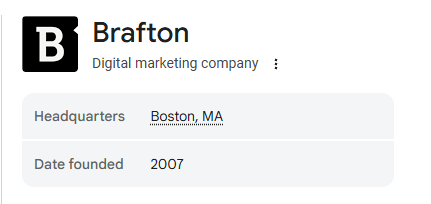
How to optimize: Because Knowledge Panels are powered by the Knowledge Graph rather than local directories, optimizing for them requires “Entity SEO.” You cannot simply fill out a form to get one. Instead, you need to establish a strong, consistent digital footprint. Ensure your website uses robust Organization or Person schema markup, maintain accurate PR and citations across high-authority sites and secure a presence on wikis or data repositories (like Wikidata). If Google generates a Knowledge Panel for your brand, be sure to click “Claim this knowledge panel” so you can suggest authoritative edits directly to Google.
Local Pack
The Local Pack (often called the Local 3-Pack) features location-specific business results displayed beneath an interactive Google Map with location pins. These appear in high-intent search queries where the search engine detects local intent. They offer searchers relevant images, review star ratings, hours of operation, address information and phone numbers. They represent one of the most prominent features that a brick-and-mortar or service-area local business can earn.
How to optimize: Local Pack rankings are based on three core pillars: distance, relevance and prominence. Because this feature is driven by Google’s local algorithm rather than standard web results, relying on social media updates won’t move the needle. You must claim and fully optimize a Google Business Profile (GBP), carefully selecting the correct primary business category — which is the strongest single relevance signal — and keeping your Name, Address and Phone number (NAP) perfectly consistent across the web. Earning a steady velocity of positive native Google reviews (rather than focusing heavily on Yelp) and building local citations will provide the strongest signals for Google to serve your business to nearby users.
People Also Ask
These are questions related to the initial search query. They usually address another aspect of the topic or expand upon the original search term using additional content found from related search terms. These appear as collapsible snippets and are usually positioned directly beneath the first few organic results. In 2021, Google also introduced a complementary module called Things to Know, which uses similar logic to surface follow-up angles in a more visual, categorized format.
How to optimize: People Also Ask (PAA) operates based on relational topics and machine learning. Adding semantic search terms and similarly related keywords to your content provides more depth and context to your web pages, which Google will use to populate its manifold PAA dropdowns. What are the follow-up questions one could logically ask in reference to your target keyword phrases? Include those questions and concise answers in your content to stand a better chance of being featured in SERPs.
Image Pack
Queries that specifically refer to photos or ones that strongly necessitate relevant imagery (such as storefronts or homes) often return a Google Image Pack. These can take the form of a horizontal carousel at the top of a search result or as a panel of images within the SERP. More recently, Google has blended image packs with short-form video and Perspectives content, making high-quality multimedia assets even more essential.
How to optimize: Use descriptive file names, alt tags, image captions and associated copy to make your images as rich and search-friendly as possible. The pages your images live on should also have relevant page titles, URLs and unique metadata. When possible, pair images with short video clips to capture visibility across both Image and Video results.
Site Links
Organic Google search results can contain an expanded pack of related links. This typically occurs when someone searches for an organization, signifying a search intent to glean more information or perhaps make a purchase. These links tend to be core top-level navigation pages such as About Us, Blog or Contact Us.
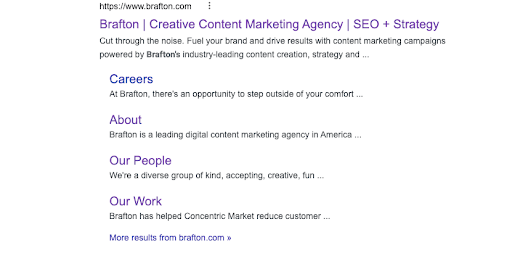
How to optimize: Site Links are auto-generated by Google based on website optimization best practices and how relevant additional links may be to a search query. That means a coherent, navigable site structure and unique page-level metadata help Google understand which Site Links should be featured. Logical internal linking reinforces topical groupings and boosts the odds of earning those extra links.
Twitter/X Carousels
This feature takes the form of a carousel showing the most recent links from a brand or particularly relevant tweets about a specific search term. For example, when users input a query related to a trending news story, they might see a carousel of tweets from authoritative news sources. In 2022, Google also introduced a Discussions & Forums feature that pulls from Reddit, Quora and Stack Exchange, providing yet another venue for conversational content to appear on the SERP.
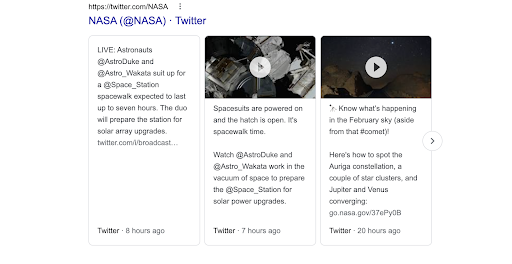
How to optimize: A regularly updated X feed allows Google to cycle through trending tweets from your brand and feature them in search results. You don’t need to be verified on X or even have a huge social following — all you have to do to be featured in SERPs is post often and encourage engagement. Tweets that have a lot of comments and retweets send strong signals to Google that your profile is relevant, thus giving you a higher chance of your tweet being featured on the Google SERP. The same logic applies to authoritative contributions within Reddit threads and other forum discussions.
News Box (Top Stories)
This Google news feature is a carousel of cards showing trending or breaking coverage related to a search query. These cards typically link out to authoritative sources of news.
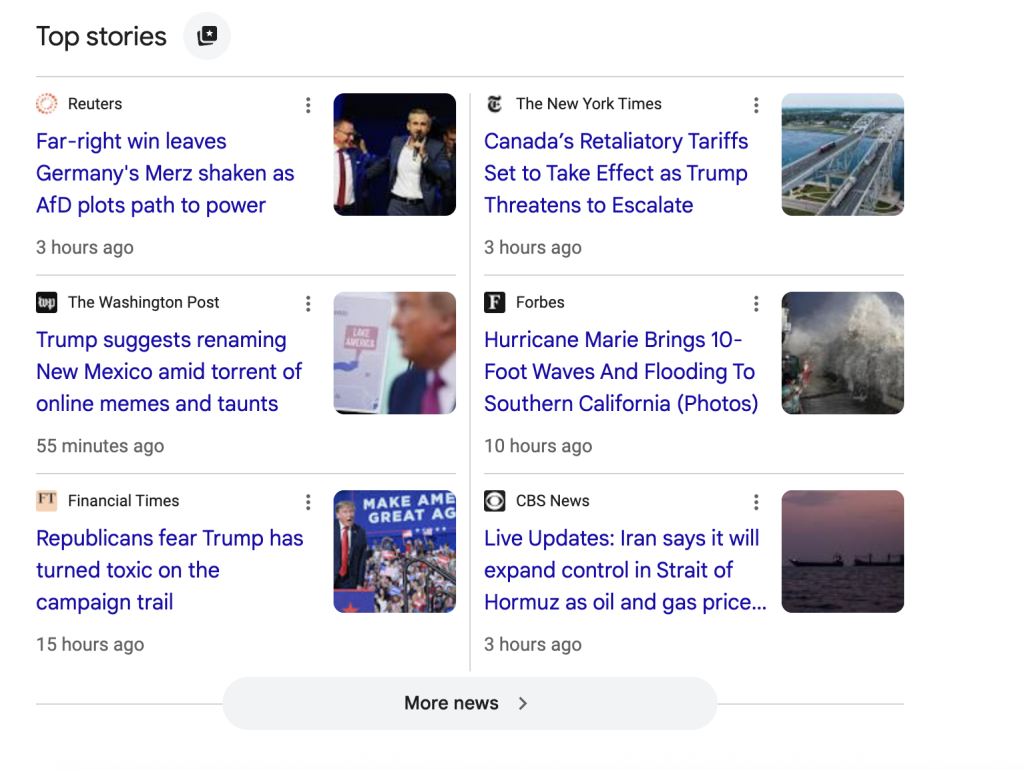
How to optimize: Usually, only larger news-based publishers appear in Top Stories because the intent behind this feature is to report breaking news and ideas in relation to a search query. You can still set yourself up for a chance of appearing at the top of SERPs by posting timely content on a hot topic or current event, in addition to following SEO best practices. Organizations that don’t generally publish news may find little value in Top Stories, but they can still benefit from issuing press releases or thought-leadership posts on industry developments to feed Google News.
Google Ads Top
Through Google Ads and based on Quality Scores, several paid ads are featured at the top of SERPs, above an organic result. The “Sponsored” label informs searchers they’re clicking on a paid advertisement.
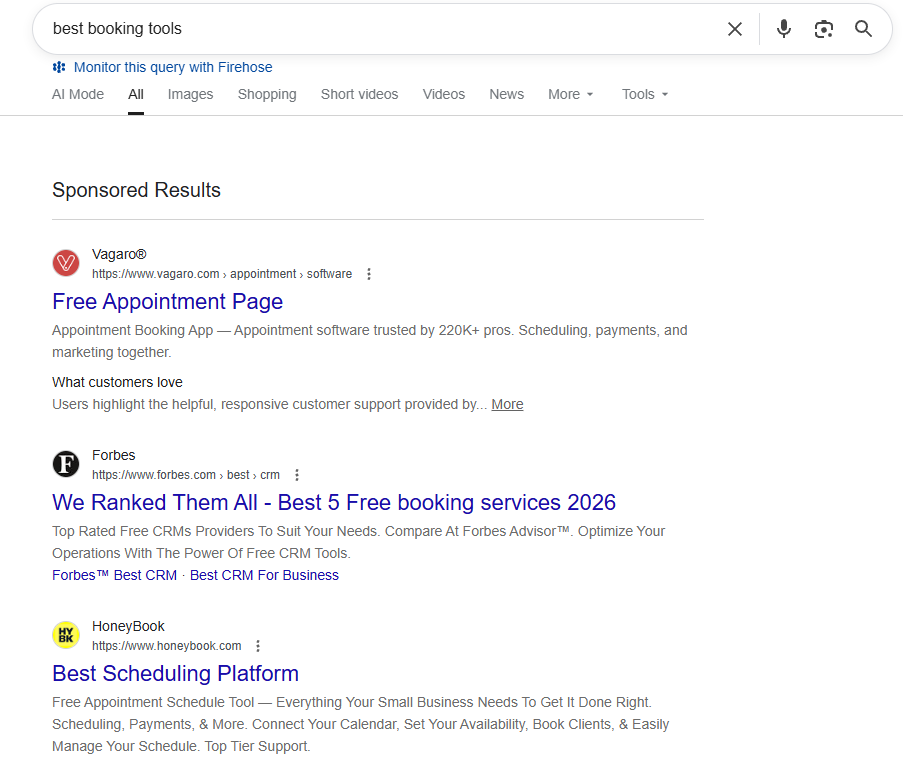
How to optimize: Ad position is dictated by a number of factors, including expected click-through rate, relevance to the search query, quality of the ad landing page and the amount of money you’ve bid within Google Ads, to name a few. You can influence Google to rank your ads at the top by bidding more, improving UX of the Google ad and targeting keywords that match the intent of your ad. You can even use Google Ads callout assets — additional lines of copy that show up below the 2 lines of your advertising copy — to highlight unique business offerings and hopefully appear higher on Google SERPs.
Google Ads Bottom
Paid ads featured below organic results are often cheaper, as the four most coveted ad positions (the very top) are more expensive and more competitive. They serve the same purpose as above-the-fold ads but don’t contribute to SERP crowding.
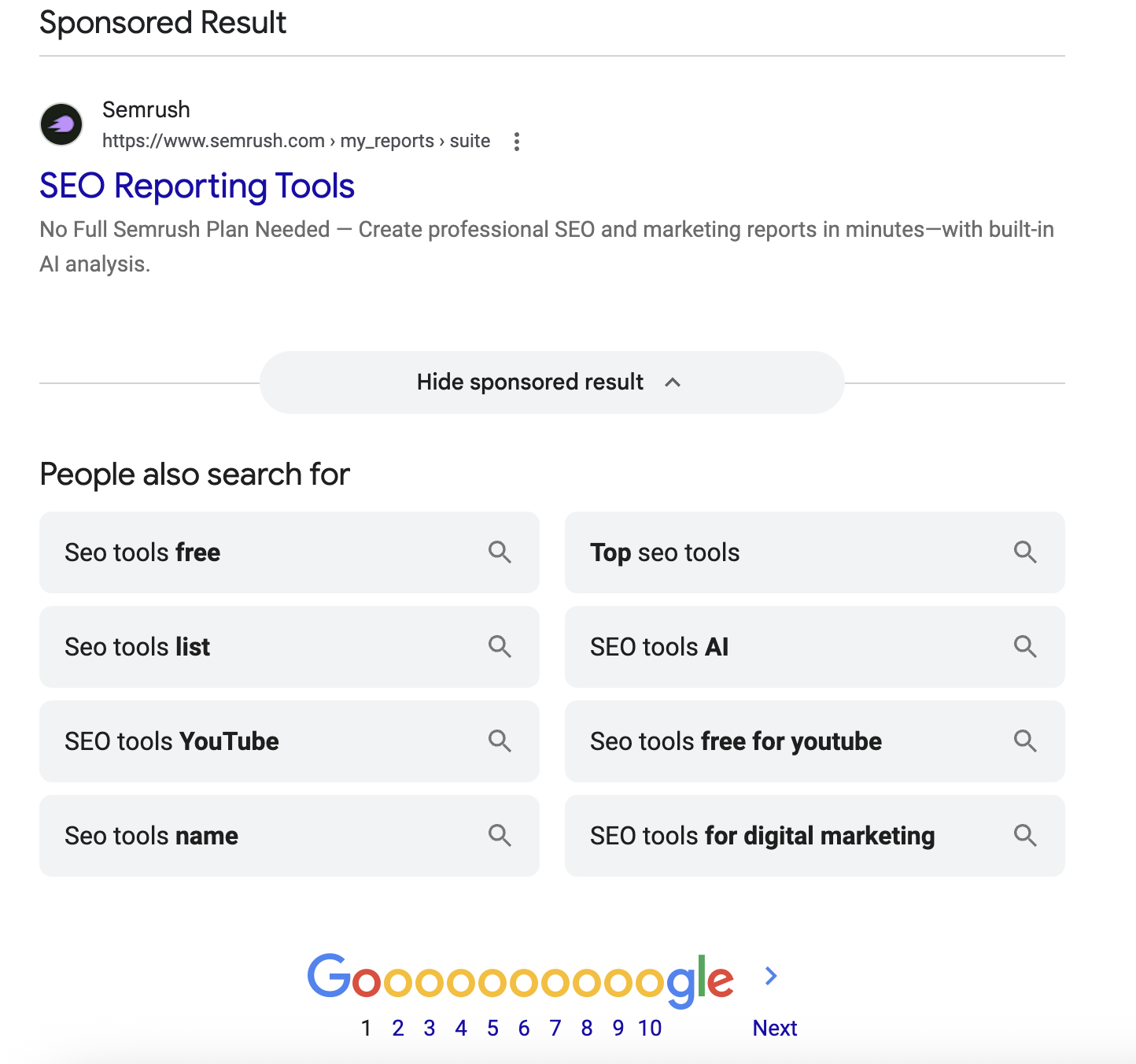
How to optimize: Ads at the bottom of SERPs are not ideal, as the overarching goal is to be the first visible listing for a keyword. However, Google may determine that organic search results actually serve the user more value than paid ads, despite your bidding on a keyword within a Google Ads auction. On the other hand, ranking above other bottom-SERP ads is still preferable; for this, you’d want to follow the same optimization tips presented in the “Google Ads Top” section. On top of that, you can check your Google Ads optimization score to help your ads rank higher and determine the health of your paid ads.
Subscribe to
The Content Marketer
Get weekly insights, advice and opinions about all things digital marketing.
Thanks for subscribing! Keep an eye out for a Welcome email from us shortly. If you don’t see it come through, check your spam folder and mark the email as “not spam.”
AI Overviews & AI Mode: The Newest Google SERP Heavyweights
Google’s AI Overviews (AIO) and AI Mode are algorithmic summaries that appear at the very top of the SERP for millions of queries. They synthesize information from multiple authoritative sources, often citing three or four sites as evidence. GrowByData reports that AI Overviews show up in approximately 47% of U.S. searches.
| Feature | Where It Appears | Primary Trigger | CTR Impact* | Key Optimization Lever |
| AI Overviews | Top of SERP, colored box | Informational & how-to queries | Can siphon almost 40% clicks from traditional organic results | Clear, concise answers + strong E-E-A-T signals |
| AI Mode | Full-screen experience (now expands dynamically by default) | Broad exploratory queries | Still emerging; early data shows deeper engagement but fewer site clicks | Comprehensive topical coverage & authoritative sourcing |
| Organic Blue Links | Below AI modules & other features | All query types | Lower CTR when features dominate | Title/meta optimization & on-page relevance |
How To Optimize Content for AI Experiences
- Answer the question in <50 words near the top of your page.
- Cite sources and data to reinforce credibility and feed Google’s quality thresholds.
- Include rich media (images, video carousels, infographics) so AIO can reference varied formats.
- Maintain entity consistency across your business profile, social channels and structured data so Google’s AI can confidently pull from you.
- Stay up-to-date on AI education, as things change fast and your strategy should too.
How Often Do SERP Features Appear? (Data Snapshot 2026)
Staying current with SERP features means knowing how frequently each one shows up. As of September 2026, these features appear at the following frequencies among the top 20 results, According to Semrush Sensor as of September 2026, this is the percentage of SERPs where each feature appears in the top 20 results:
- AI Overviews: 53.99%.
- People Also Ask: 76.68%.
- Sitelinks: 51.65%.
- Image Packs: 21.59%.
- Video Carousels: 19.63%.
- Knowledge Panels: 18.85%.
- Local Packs: 19.24%.
These numbers shift weekly, so we recommend ongoing monitoring via Google Search Console and Semrush to keep your content optimization roadmap data-driven.
SERP Features Through Time: An Example
If you open a new tab now and search Google for something like “ice cream shops,” you will likely see a Google Map of your local area with a list of ice cream shops below it. Underneath that, you’ll probably find links to review sites like Yelp and perhaps the websites or social media pages of local ice cream businesses. You may also see an AI Overview recommending the “top-rated gelato spots,” complete with star ratings and an embedded image pack of delicious scoops.
If you were to travel back in time to the year 2005 and type the same query into the Google search bar, you would see quite a different SERP. There would be no map, and likely no links relevant to your geographic position.
The earliest SERPs consisted solely of links. And while there are still quite a few similarities between SERPs of yesteryear and today, a simple search shows just how much things have changed.
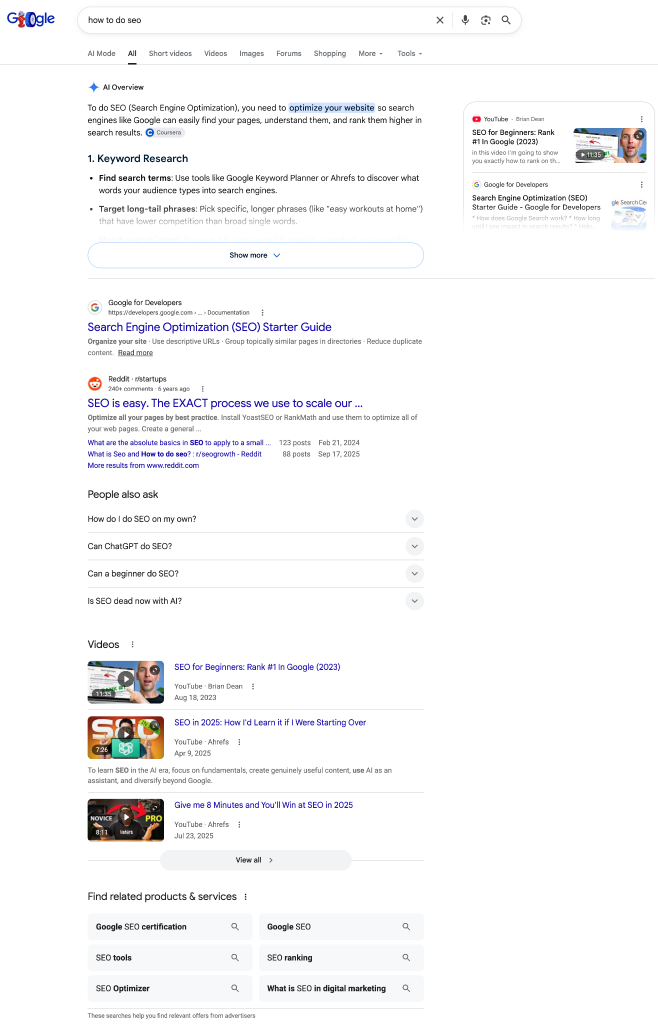
The modern SERP contains much more than links. Users can see information about their query in the knowledge graph, get links to related queries, scroll through social perspectives and even watch short-form videos directly in the results.
Why SERP Features Are Important
The purpose behind a Google SERP feature is to provide users with as much relevant information as possible while offering a smooth user experience. For instance, the AIO is there to provide information at a glance and help answer people’s questions without them having to look at tons of websites. (That’s why AI visibility is so important for brands — you want to be seen, even if you’re not getting clicks.) In addition, social media results help users understand up-to-the-minute trends.
SERP features make it easier for users to get exactly what they need so they can take the next step as quickly as possible. So, if a user is driving around town and searches for “ice cream shops” on their mobile device, Google will help them find the best ice cream shop within driving distance. SERP features provide depth and context to organic results, but they can also decrease clicks by satisfying intent directly, leading to the rise of the zero-click search phenomenon that every SEO strategist must now consider.
How Does a SERP Feature Fit Into Your SEO Strategy?
If the goal of SEO is to get people to find and visit your website, it may seem counterintuitive to try to get your content into a SERP feature. After all, if the info people need is directly available within the SERP, won’t searchers be less likely to click through to your site?
Yes and no.
If your web pages don’t earn a featured spot in SERPs, it means someone else has provided information that is more relevant to searchers. It also means that Featured Snippets, AI Overviews and the like will appear above all other results, pushing your content further down the page. This is bad for your SEO, as the former glory of being on Page 1 holds less significance if you don’t actually own whatever the top-appearing SERP feature is.
Conversely, you can drive higher click-through rates, brand awareness and content marketing visibility by winning SERP features, thus improving your SEO.
And as your click-through rates and engagement metrics rise, Google’s NavBoost system — now increasingly intertwined with generative engine optimization (GEO) signals — will begin to recalculate the value of your listings based on those “good clicks” and may subsequently adjust your rankings upward.
So think of it this way: If your content is in a SERP feature, it means you’re producing relevant, useful content! Google sees your site as authoritative. That’s good for your SEO, and your commercial goals, in the long run.
Optimizing Your Content With a SERP Feature in Mind: The Basics
By design, web developers should update all relevant web pages with schema markup, as this structured data helps search engines definitively understand your content and qualifies your pages for Rich Results (like review stars or product prices).
However, it’s important to remember that you do not need schema to win a Featured Snippet or be cited in an AI Overview. Google’s algorithms are highly evolved; they scan and extract information directly from your standard text as long as your web page closely matches search intent. But you shouldn’t make the bots work too hard — structuring your web pages properly with clear headings, short paragraphs and bulleted lists is always a good idea. On top of making your site easily scannable by Google crawlers, this visual structure makes it easier for users to read and gain knowledge from your content — which is the main goal in the end.
Additionally, don’t neglect off-page signals; our primer on off-page SEO for AI visibility explains how authoritative mentions can nudge Google’s AI to trust (and cite) you.
Getting featured in SERPs is a great way to build your website’s authority and ranking. With the right strategy, you’ll drive more traffic to your website where you can convert users to paying customers.
Now that you know what SERP features exist and how to optimize your website to win them, get out there and try it out!
FAQ: Google SERP Features
How Long Does It Take to Show Up in a SERP Feature?
Timelines vary, but most pages that earn Featured Snippets or AI Overview citations do so within 4-12 weeks of publication or major optimization, assuming sufficient authority and crawl frequency.
Why Are SERPs Important for SEO?
SERPs are the front door to digital discovery; they dictate where, how and whether your audience engages with your brand, influences conversion paths and reflect Google’s assessment of your overall relevance.
How Can I Appear in Google Knowledge Panels?
Maintain a consistent business profile across Google Business Profile, Wikipedia, Crunchbase and authoritative directories. Use on-site structured data (Organization, Person or LocalBusiness schema) and secure media coverage to reinforce your entity’s notability.
Can Video Content Improve My Chances of Appearing in SERP Features?
Absolutely. Well-optimized videos, especially on YouTube, are eligible for both standalone Video results and expansive video carousels. They also feed AI Overviews, which increasingly quote or even embed video content.
How Often Do SERP Features Change?
Google tests new layouts daily. Historical tracking shows micro-changes can roll out within days, while major introductions (like AI Overviews) emerge over months. Continuous monitoring is essential — see our post on tracking SERPs for the latest tools.
Editor’s Note: Updated September 2026.